Click Mobs
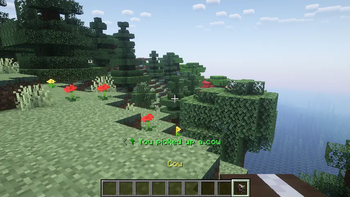
ModrinthClick to pick up any mob into your inventory and carry them around!
1.3.4+26.3-fabric · MC 26.3 · Fabric
Files
1.3.4+26.3-fabric
releaseClickMobs 1.3.4 for Fabric
26.3fabric2026-09-20 · 14.2K downloads
ClickMobs-1.3.4+26.3-fabric.jar · 407 KB
1.3.4+1.21.11-neoforge
releaseClickMobs 1.3.4 for NeoForge
1.21.11neoforge2026-06-21 · 1.3K downloads
ClickMobs-1.3.4+1.21.11-neoforge.jar · 409 KB
1.3.4+1.21.1-neoforge
releaseClickMobs 1.3.4 for NeoForge
1.21.1neoforge2026-06-21 · 4K downloads
ClickMobs-1.3.4+1.21.1-neoforge.jar · 407 KB
1.3.4+1.21.11-fabric
releaseClickMobs 1.3.4 for Fabric
1.21.11fabric2026-06-21 · 26.7K downloads
ClickMobs-1.3.4+1.21.11-fabric.jar · 406 KB
1.3.4+1.21.1-fabric
releaseClickMobs 1.3.4 for Fabric
1.21.11.21fabric2026-06-21 · 5.3K downloads
ClickMobs-1.3.4+1.21.1-fabric.jar · 405 KB
1.3.4+1.20.1-fabric
releaseClickMobs 1.3.4 for Fabric
1.20.1fabric2026-06-21 · 2.6K downloads
ClickMobs-1.3.4+1.20.1-fabric.jar · 405 KB
1.3.4+26.1-fabric
releaseClickMobs 1.3.4 for Fabric
26.1.226.1.126.1fabric2026-06-21 · 13.4K downloads
ClickMobs-1.3.4+26.1-fabric.jar · 407 KB
1.3.4+26.2-fabric
releaseClickMobs 1.3.4 for Fabric
26.2fabric2026-06-21 · 32.8K downloads
ClickMobs-1.3.4+26.2-fabric.jar · 407 KB
1.3.3+26.1-fabric
releaseClickMobs 1.3.3 for Fabric
26.1.226.1.126.1fabric2026-04-20 · 12.4K downloads
ClickMobs-1.3.3+26.1-fabric.jar · 406 KB
paper-1.3.1
releaseClickMobs 1.3.1 for Paper
26.326.226.1.226.1.1+13paperpurpur2026-03-26 · 44.6K downloads
ClickMobs-paper-1.3.1.jar · 179 KB
1.3.2+26.1-fabric
releaseClickMobs 1.3.2 for Fabric
26.1fabric2026-03-26 · 2.2K downloads
ClickMobs-1.3.2+26.1-fabric.jar · 406 KB
1.3.2+1.21.11-fabric
releaseClickMobs 1.3.2 for Fabric
1.21.11fabric2026-03-26 · 12.7K downloads
ClickMobs-1.3.2+1.21.11-fabric.jar · 406 KB
1.3.2+1.21.11-neoforge
releaseClickMobs 1.3.2 for NeoForge
1.21.11neoforge2026-03-26 · 332 downloads
ClickMobs-1.3.2+1.21.11-neoforge.jar · 408 KB
1.3.1+1.21.8-neoforge
releaseClickMobs 1.3.1 for NeoForge
1.21.81.21.71.21.6neoforge2026-01-10 · 735 downloads
ClickMobs-1.3.1+1.21.8-neoforge.jar · 407 KB
1.3.1+1.21.8-fabric
releaseClickMobs 1.3.1 for Fabric
1.21.81.21.71.21.6fabric2026-01-10 · 2K downloads
ClickMobs-1.3.1+1.21.8-fabric.jar · 405 KB
1.3.1+1.21.5-neoforge
releaseClickMobs 1.3.1 for NeoForge
1.21.5neoforge2026-01-10 · 105 downloads
ClickMobs-1.3.1+1.21.5-neoforge.jar · 407 KB
1.3.1+1.21.5-fabric
releaseClickMobs 1.3.1 for Fabric
1.21.5fabric2026-01-10 · 831 downloads
ClickMobs-1.3.1+1.21.5-fabric.jar · 404 KB
1.3.1+1.21.4-fabric
releaseClickMobs 1.3.1 for Fabric
1.21.4fabric2026-01-10 · 1.2K downloads
ClickMobs-1.3.1+1.21.4-fabric.jar · 405 KB
1.3.1+1.21.4-neoforge
releaseClickMobs 1.3.1 for NeoForge
1.21.41.21.31.21.2neoforge2026-01-10 · 133 downloads
ClickMobs-1.3.1+1.21.4-neoforge.jar · 407 KB
1.3.1+1.21.1-fabric
releaseClickMobs 1.3.1 for Fabric
1.21.11.21fabric2026-01-10 · 5.2K downloads
ClickMobs-1.3.1+1.21.1-fabric.jar · 404 KB
Files are delivered unmodified from Modrinth's servers and verified against the SHA-512 hash published by the project. The project's license applies to every file; check it before redistributing.
Gallery
About


ClickMobs
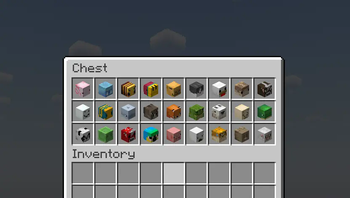
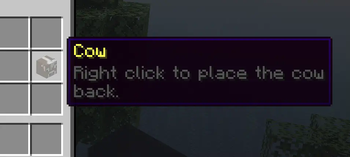
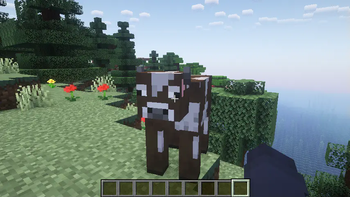
ClickMobs is a simple quality of life mod/plugin that allows you to pick up any mob into your inventory and carry them around.




Features
- Pick mobs up into your inventory by shift + right clicking them.
- Place them back by placing the mob head.
- Place the mobs directly into boats, minecarts, etc.
- Use dispensers to spawn the mobs back automatically.
- Clean messages, sound effects and particle effects.
- Blacklist/whitelist any mob you want using tags!
- Language support: German & English (Paper/Spigot only)
Blacklisting & Whitelisting Mobs
- Blacklist/whitelist any mob you want using tags.
- You can use and combine tags like
?hostile,?nametagged(...),?baby, etc. to select multiple mobs based on their properties. - For more information, read the wiki: Wiki/Tags
- You can use and combine tags like
- You can also blacklist/whitelist individual mobs.
- You can manage the blacklist/whitelist in the "config.yml" file.
Configuration
- For Paper/Spigot, you will find the configuration file at "plugins/ClickMobs/config.yml".
- For Fabric, you will find the configuration file at ".minecraft/config/ClickMobs/config.yml".
- WARNING: If you are using another client (i.E. Modrinth App), the config file will be located at the installation directory instead.
- Make sure you save the config file after making changes and do the following:
- For Paper/Spigot, reload/restart your server or use the command "/clickvillagers reload".
- For Fabric, restart your game or server fully.
Compatibility
- ClickMobs is fully compatible with ClickVillagers!
Licensing
- This project is licensed under the GPLv3 license.
- Refer to LICENSE.md for more information.