
Custom Damage Overlay Color
ModrinthChange hit color (tint) of all entities to ANY color!
1.2 · MC 1.21.11 · Minecraft
Files
1.2
releaseCustom Damage Overlay Color 1.2
1.21.111.21.101.21.91.21.8+13minecraft2026-01-02 · 11.3K downloads
Custom Damage Overlay Color 1.2.zip · 401 KB
1.1
releaseCustom Damage Overlay Color 1.1
1.21.81.21.71.21.61.21.5+10minecraft2025-09-13 · 2.5K downloads
Custom Damage Overlay Color 1.1.zip · 400 KB
1.0
releaseCustom Damage Overlay Color 1.0
1.17.11.17minecraft2024-09-21 · 2K downloads
Custom Damage Overlay Color 1.17.x.zip · 393 KB
1.0
releaseCustom Damage Overlay Color 1.0
1.20.11.201.19.41.19.3+6minecraft2024-09-21 · 1.9K downloads
Custom Damage Overlay Color 1.18 - 1.20.1.zip · 393 KB
1.0
releaseCustom Damage Overlay Color 1.0
1.21.51.21.41.21.31.21.2+7minecraftvanilla2024-09-21 · 7.7K downloads
Custom Damage Overlay Color.zip · 398 KB
Files are delivered unmodified from Modrinth's servers and verified against the SHA-512 hash published by the project. The project's license applies to every file; check it before redistributing.
Gallery
About
Custom Damage Overlay Color
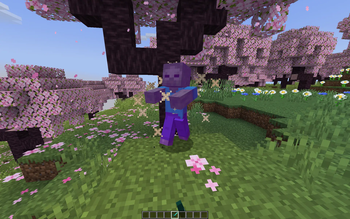
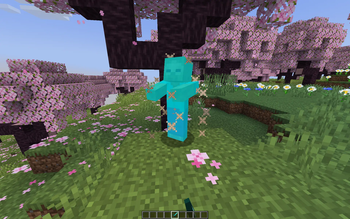
This resource pack allows to change overlay color of all entities when they take damage. By defult this resource pack changes it to green, as an example.
Versions: 1.17 — 1.21.11
Works with both Optifine and Sodium.
How to change the color
Go into the resource pack and open a file assets/minecraft/shaders/include/change_damage_overlay.glsl, choose a color and put it into the second line of the file. For example if you want to change the color to purple (#AA00FF) with 50% transparency, the second line of the file would look like this:
vec4 RGBColor = vec4(170,0,255,127);
And if you want cyan (#00FFFF) color with the same transparency as in vanilla, it would look like this:
vec4 RGBColor = vec4(0,255,255,178);