
IrisDESCENT
ModrinthA very cool shader about making minecraft even more beautiful
0.1.3 · MC 26.2 · Iris, Optifine
Files
0.1.3
betaIrisDESCENT 0.1.3
26.226.1.226.1.126.1+19irisoptifine2026-06-23 · 4.8K downloads
IrisDESCENT-beta-0.1.3.zip · 75 KB
0.0.2
alpha0.0.2
26.226.1.226.1.126.1+19irisoptifine2026-06-18 · 63 downloads
IrisDESCENT.zip · 70 KB
0.0.1
alpha0.0.1
1.21.1irisoptifine2026-06-18 · 30 downloads
IrisDESCENT.zip · 69 KB
Files are delivered unmodified from Modrinth's servers and verified against the SHA-512 hash published by the project. The project's license applies to every file; check it before redistributing.
Gallery
About
IrisDescent
IrisDescent is a stylized, non-realistic shader pack for Minecraft: Java Edition, built exclusively for the Iris shader loader.
Visual Style
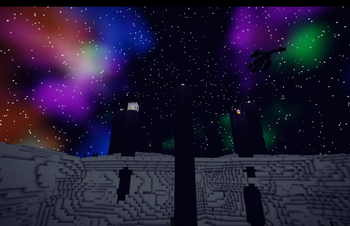
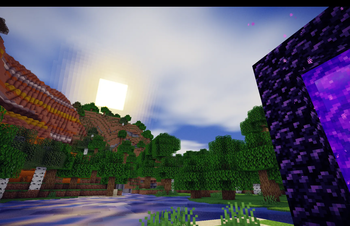
IrisDescent is not a realistic shader. It is a stylized, high-contrast, atmospheric shader inspired by dark fantasy aesthetics and anime color grading.
If you want your world to look cooler, and similar to vanilla, without loosing too much fps — IrisDescent is for you.
Features
- Stylized lighting — semi-toon shading with quantized light bands, giving terrain a painted, graphic quality rather than a smooth photorealistic gradient
- Iridescent water — dark, reflective water surface with animated normals and vivid underwater color
- Custom sky gradient — dawn and dusk render warm amber-to-violet gradients; noon is a deep saturated blue rather than vanilla pale blue
- Color grading — Vanilla
- PCF soft shadows — 2048x shadow map with softened edges
Compatibility
| Loader | Iris 1.7+ (Fabric / NeoForge) |
| Minecraft | 1.21.1 Java Edition (tested), should work on 1.20.1+ |
| OptiFine | ✅ Compatible |
| Sodium | ✅ Compatible (required by Iris) |
| GPU | Any GPU capable of running Iris shaders |
Installation
- Install Iris (includes Sodium automatically)
- Launch Minecraft and go to Options → Video Settings → Shader Packs
- Drop the
IrisDescent.zipinto the shaderpacks folder - Select IrisDescent in the list and click Apply
Early Release
This is an early release. Some visuals may be rough around the edges — if you encounter issues or have feedback, feel free to open a report in the Issues tab.