
LifeWars (LifeSteal)
ModrinthA very simple Lifesteal SMP plugin, Custom recipe's and Easy configuration!
0.1.9 · MC 1.21.11 · Bukkit, Paper, Purpur, Spigot
Files
0.1.9
releaseLifeWars 0.1.9
1.21.111.21.101.21.91.21.8+4bukkitpaperpurpurspigot2026-09-14 · 1.3K downloads
LifeWars-0.1.9.jar · 46 KB
1 more file
- LifeWars.zip
- LifeWars.zip
0.1.9-b
betaLifeWars 0.1.9 (BETA)
1.21.111.21.101.21.91.21.8+4bukkitpaperpurpurspigot2026-09-13 · 66 downloads
LifeWars-0.1.9.jar · 45 KB
1 more file
- LifeWars.zip
- LifeWars.zip
0.1.8
alphaLifeWars 0.1.8
1.21.111.21.101.21.91.21.8+4bukkitpaperpurpurspigot2026-08-10 · 814 downloads
LifeWars-0.1.8.jar · 43 KB
1 more file
- LifeWars.zip
- LifeWars.zip
0.1.7
releaseLifeWars 0.1.7
1.21.51.21.41.21.31.21.2+2bukkitpaperspigot2025-07-13 · 14.4K downloads
LifeWars-0.1.7-1.21.5..jar · 28 KB
0.1.6
releaseLifeWars 0.1.6
1.21.11.21bukkitpaperspigot2025-06-24 · 1.7K downloads
LifeWars-0.1.6-1.21.1.jar · 28 KB
0.1.5
releaseLifeWars 0.1.5 BugFix
1.20.61.20.51.20.41.20.3+3bukkitpaperspigot2024-06-11 · 16.4K downloads
LifeWars-1.0.jar · 27 KB
0.1.4
releaseLifeWars 0.1.4 Bugfix
1.20.41.20.31.20.21.20.1+1bukkitpaperspigot2024-03-26 · 1.3K downloads
LifeWars-1.0.jar · 25 KB
0.1.3
releaseLifeWars 0.1.3
1.20.21.20.11.201.19.4+9bukkitpaperspigot2023-10-19 · 2.7K downloads
LifeWars-1.17-1.20.2-.jar · 26 KB
0.1.2
releaseLifeWars 0.1.2 BUGFiX
1.20.21.20.11.201.19.4+9bukkitpaperspigot2023-10-16 · 343 downloads
LifeWars-1.17-1.20.2.jar · 24 KB
0.1.2
releaseLifeWars 0.1.2
1.20.21.20.11.201.19.4+9bukkitpaperspigot2023-10-16 · 243 downloads
LifeWars-1.17-1.17.1-1.20.2.jar · 24 KB
0.1.1
releaseLifeWars 0.1.1
1.18.21.18.11.18bukkitpaperspigot2023-10-16 · 130 downloads
LifeWars-1.18-1.18.2.jar · 24 KB
0.1.0
releaseLifeWars 0.1.0
1.19.41.19.31.19.21.19.1+1bukkitpaperspigot2023-10-16 · 211 downloads
LifeWars-1.19-1.19.4.jar · 24 KB
0.0.9
releaseLifeWars 0.0.9
1.20.21.20.11.20bukkitpaperspigot2023-10-16 · 153 downloads
LifeWars-1.20-1.20.2.jar · 24 KB
0.0.8.2
releaseLifeWars 0.0.8.2
1.18.21.18.11.18bukkitpaperspigot2023-10-15 · 88 downloads
LifeWars-1.18-1.18.2.jar · 22 KB
0.0.8.1
releaseLifeWars 0.0.8.1
1.19.41.19.31.19.2bukkitpaperspigot2023-10-15 · 140 downloads
LifeWars-1.19.2-1.19.4.jar · 22 KB
0.0.8
releaseLifeWars 0.0.8
1.20.21.20.11.20bukkitpaperspigot2023-10-15 · 431 downloads
LifeWars-1.20-1.20.2.jar · 22 KB
0.0.7
alphaLifeWars 0.0.7
1.14.41.14.31.14.21.14.1+1paper2023-10-15 · 185 downloads
LifeWars-0.0.8-1.14-1.14.4.jar · 52 KB
0.0.6
alphaLifeWars 0.0.6
1.15.21.15.11.151.14.4paper2023-10-15 · 166 downloads
LifeWars-0.0.7-1.15-1.15.2.jar · 52 KB
0.0.5
releaseLifeWars 0.0.5
1.16.51.16.41.16.31.16.2+2paper2023-10-14 · 1.5K downloads
LifeWars-0.0.6-1.16-1.16.5.jar · 21 KB
0.0.4
releaseLifeWars 0.0.4
1.17.11.17paper2023-10-14 · 97 downloads
LifeWars-0.0.4-1.17-1.17.1.jar · 21 KB
0.0.3
releaseLifeWars 0.0.3
1.18.21.18.11.18paper2023-10-14 · 89 downloads
LifeWars-1.0.jar · 21 KB
0.0.2
releaseLifeWars 0.0.2
1.19.41.19.31.19.2paper2023-10-14 · 103 downloads
LifeWars-1.19.2-0.0.2.jar · 21 KB
0.0.1
releaseLifeWars 0.0.1
1.20.21.20.11.20paper2023-10-13 · 183 downloads
LifeWars-1.0.jar · 21 KB
Files are delivered unmodified from Modrinth's servers and verified against the SHA-512 hash published by the project. The project's license applies to every file; check it before redistributing.
Gallery
About
LifeWars
What You Should Know!
LifeWars is my own Minecraft plugin that introduces the popular lifesteal mechanic to your server or gameplay.
LifeWars is designed to be highly configurable, with 25+ configuration options allowing you to customize how lifesteal works on your server.
Why I Made LifeWars
I made LifeWars because I wanted a lifesteal plugin that I could actually use for my own communities and servers.
I also wanted to make something that gives server owners more control over their lifesteal experience instead of being stuck with a fixed system.
Things YOU Can Do
(Only a small part of the plugin!)
- ✅ Enable / Disable the entire plugin
- ✅ Enable / Disable Reviving
- ✅ Enable / Disable Heart usage and equipping
- ✅ Set Maximum Health
- ✅ Set Revive Health
- ✅ Toggle Commands
- ✅ Enable / Disable Custom Recipes
- ✅ Enable / Disable Heart Recipes
- ✅ Enable / Disable Revive Recipes
- ✅ Set Custom Messages
- ✅ Change Item Names
- ✅ Change Item Lore
- ✅ Customize Heart Items
- ✅ Customize Revive Items
- ✅ Customize Crafting Recipes
- ✅ Edit Recipes directly in-game
- ✅ Spawn LifeWars items through admin commands
- ✅ Manage eliminated/banned players
- ✅ Configure almost every part of the plugin
Custom Crafting Recipes
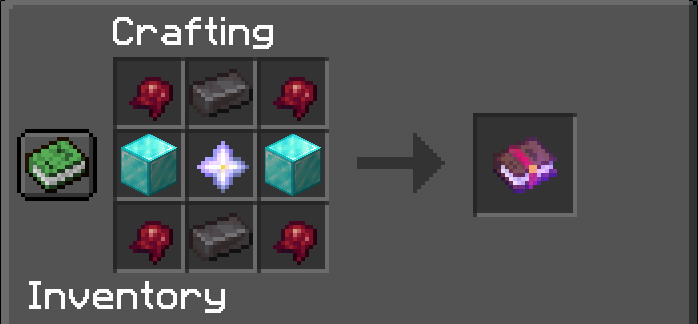
LifeWars now supports fully configurable crafting recipes.
You can customize the layouts for:
|- Heart Recipe:
|- Revive Recipe:
Recipes can also be edited in-game using the recipe editor, allowing server administrators to change recipes without manually editing the configuration.
Commands
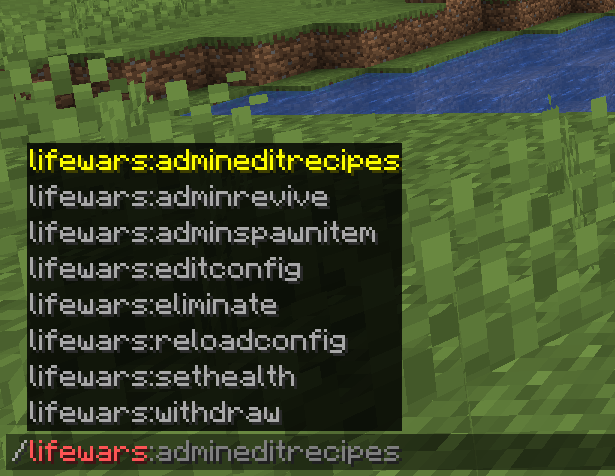
LifeWars includes several commands for both players and administrators.
Most of the commands are admin-related, allowing server owners to manage health, revives, configuration, recipes, and LifeWars items.
Some of the available functionality includes:
- Admin Revive
- Eliminate
- Set Health
- Reload Configuration
- Edit Configuration
- Admin Item Spawning
- Recipe Editing
Permissions
- LifeWars.adminrevive.use
- LifeWars.EditConfig.use
- LifeWars.sethealth.use
- LifeWars.eliminate.use
- LifeWars.reloadconfig.use
- LifeWars.adminspawnitem.use
How to Use Items
|- Revive Item
Step 1
Craft the Revive Item.
Depending on your configuration, the recipe may not appear in the crafting recipe book because Minecraft does not recognize the custom Heart ingredient normally.
Step 2
Rename the Revive Item to the name of the eliminated player you want to revive.
Step 3
Right-click with the renamed Revive Item.
If the player is eliminated, they will be revived.
|- Heart Item
Step 1
Craft the Heart using the configured recipe.
Step 2
Done!
You can use Hearts to:
- ❤️ Give health to another player
- ❤️ Equip/use a Heart
- ❤️ Use Hearts in the Revive recipe
Heart System
Hearts are the main item used by the LifeWars lifesteal system.
Players can configure how Hearts work, including whether they can be used or equipped and how much health players can have.
LifeWars also supports custom item models and CustomModelData, allowing resource packs to give the Heart item a completely custom appearance.
Elimination & Reviving
When a player reaches the configured elimination condition, they can be added to the LifeWars banned/eliminated player system.
The plugin includes:
- Player elimination
- Automatic ban handling
- Ban and kick functionality
- Unbanning through the revive system
- Offline-player handling
- Revive item validation
- Configurable revive health
Banned players are stored in a dedicated BannedPlayers.yml file.
Configuration
LifeWars is built around configuration.
You can edit the plugin's config.yml to change things such as:
- Maximum health
- Revive health
- Heart settings
- Revive settings
- Item names
- Item lore
- Messages
- Crafting recipes
- PvP restrictions
- Banned items
- Plugin features
The configuration also contains comments explaining what different settings do.
Basic Configuration
features:
  reviveBookEnabled: true
  heartUseEnabled: true
  withdrawCommandEnabled: true

gameplay:
  maxHealth: 40
  reviveHealth: 8
  dropHeartsIfMax: true

items:
  # Heart
  heartName: "<bold><#d9252e>Heart"
  heartLore: "<gray>Right-click to use!"
  # New string-based item model key (1.21+ style). Example: "lifewars:defaultheart"
  # If set, this is used instead of heartCustomModelData.
  heartItemModel: "lifewars_defaultheart"
  heartCustomModelData: -1
  # Revive Book
  reviveBookName: "<aqua>Revive Book"
  reviveBookLore: "<dark_aqua>Rename this book to the player name you want to revive, then right-click to revive that player!"

recipes:
  customRecipesEnabled: true
  heartRecipeEnabled: true
  reviveBookRecipeEnabled: true
  # Recipe layouts going from left to right, top to bottom, and empty spaces are represented by AIR
  layouts:
    heart:
      grid:
        - DIAMOND_BLOCK
        - GOLD_BLOCK
        - DIAMOND_BLOCK
        - NETHERITE_INGOT
        - TOTEM_OF_UNDYING
        - NETHERITE_INGOT
        - DIAMOND_BLOCK
        - GOLD_BLOCK
        - DIAMOND_BLOCK
    revivebook:
      grid:
        - DIAMOND_BLOCK
        - CUSTOM_HEART
        - GOLD_BLOCK
        - CUSTOM_HEART
        - NETHER_STAR
        - CUSTOM_HEART
        - GOLD_BLOCK
        - CUSTOM_HEART
        - DIAMOND_BLOCK

messages:
  prefix: "<dark_gray>[<red>Life<gold>Wars<dark_gray>]"
  announceAdminRevive: true
  usageError: "<red>Usage: %usage%"
  needToBePlayer: "<red>You must be a player to use this command!"
  playerNotFound: "<red>Player not found!"
  disabledInConfigMsg: "<red>This feature is disabled in the config!"
  eliminateSuccess: "<gray>You have eliminated <red>%player%<gray>!"
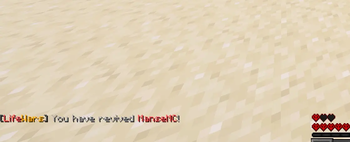
  reviveSuccess: "<gray>You have revived <red>%player%<gray>!"
  onlyReviveElimPlayers: "<red>You can only revive eliminated players!"
  eliminatedJoin: "<red>You have no hearts left!"
  eliminatedReason: "<dark_red>Ran out of lives."
  setHeartsConfirmSingle: "<gray>Set <red>%player%<gray>'s hearts to <red>%amount%<gray> hearts"
  reloadMsg: "<gray>Reloaded the plugin!"
  noWithdraw: "<red>You will be eliminated if you withdraw one more heart!"
  inventoryFull: "<red>Your inventory is full! You cannot withdraw!"
  withdrawMin: "<red>You cannot withdraw less than 1 heart!"
  successWithdraw: "<gray>You received %amount%x <red>%item%<gray>!"
  maxHeartLimitReached: "<red>You have already reached %limit% hearts!"
  recipeNotCraftable: "<red>You cannot craft this item!"
  recipeNotFound: "<red>This recipe does not exist!"
  recipeSavedActionbar: "<green>Recipe saved!"
  configKeyNotFound: "<red>Config key not found: %key%"
  configUpdated: "<gray>Config value <red>%key%<gray> set to <red>%value%"
Recipe Editor
LifeWars includes an in-game recipe editor.
Server administrators can:
- Edit recipe layouts
- Change recipe ingredients
- Configure Heart recipes
- Configure Revive recipes
- Save recipes directly from the game
- Reload recipes without modifying the plugin itself
This makes it much easier to customize LifeWars for your server.
Resource Pack Support
LifeWars supports custom models for its items.
Heart items can use:
- Custom Item Models
- CustomModelData
- CustomModelData Strings
This allows resource packs to give LifeWars items their own unique appearance.
Contact Me
If you have any suggestions, bugs, or ideas for LifeWars, feel free to contact me @ https://discord.gg/weYbKCmhsY