
MCXboxBroadcast
ModrinthA simple tool that broadcasts an existing Geyser/Bedrock server over Xbox Live.
162 · MC 26.3 · Geyser
Files
162
releaseBuild 162
26.3geyser2026-10-29 · 1.2K downloads
MCXboxBroadcastExtension.jar · 16 MB
161
releaseBuild 161
26.3geyser2026-10-29 · 100 downloads
MCXboxBroadcastExtension.jar · 16 MB
160
releaseBuild 160
26.3geyser2026-10-27 · 1.2K downloads
MCXboxBroadcastExtension.jar · 16 MB
159
releaseBuild 159
26.2geyser2026-10-03 · 12.5K downloads
MCXboxBroadcastExtension.jar · 39 MB
158
releaseBuild 158
26.2geyser2026-10-02 · 558 downloads
MCXboxBroadcastExtension.jar · 39 MB
157
releaseBuild 157
26.2geyser2026-09-25 · 2K downloads
MCXboxBroadcastExtension.jar · 39 MB
156
releaseBuild 156
26.2geyser2026-09-24 · 318 downloads
MCXboxBroadcastExtension.jar · 39 MB
155
releaseBuild 155
26.2geyser2026-09-18 · 1.9K downloads
MCXboxBroadcastExtension.jar · 35 MB
154
releaseBuild 154
26.2geyser2026-09-15 · 837 downloads
MCXboxBroadcastExtension.jar · 40 MB
153
releaseBuild 153
26.2geyser2026-09-01 · 4.1K downloads
MCXboxBroadcastExtension.jar · 40 MB
152
releaseBuild 152
26.2geyser2026-08-28 · 1.2K downloads
MCXboxBroadcastExtension.jar · 40 MB
151
releaseBuild 151
26.2geyser2026-08-23 · 1.4K downloads
MCXboxBroadcastExtension.jar · 40 MB
150
releaseBuild 150
26.2geyser2026-08-20 · 783 downloads
MCXboxBroadcastExtension.jar · 40 MB
149
releaseBuild 149
26.2geyser2026-08-04 · 4.3K downloads
MCXboxBroadcastExtension.jar · 40 MB
148
releaseBuild 148
26.1.226.1.126.1geyser2026-07-29 · 1.6K downloads
MCXboxBroadcastExtension.jar · 39 MB
147
releaseBuild 147
26.1.226.1.126.1geyser2026-07-22 · 1.8K downloads
MCXboxBroadcastExtension.jar · 39 MB
146
releaseBuild 146
26.1.226.1.126.1geyser2026-07-22 · 22 downloads
MCXboxBroadcastExtension.jar · 39 MB
145
releaseBuild 145
26.1.226.1.126.1geyser2026-07-13 · 2K downloads
MCXboxBroadcastExtension.jar · 39 MB
144
releaseBuild 144
26.1.226.1.126.1geyser2026-06-18 · 5.2K downloads
MCXboxBroadcastExtension.jar · 39 MB
143
releaseBuild 143
26.1.226.1.126.1geyser2026-06-17 · 388 downloads
MCXboxBroadcastExtension.jar · 39 MB
Files are delivered unmodified from Modrinth's servers and verified against the SHA-512 hash published by the project. The project's license applies to every file; check it before redistributing.
Gallery
About
MCXboxBroadcast



A simple tool that broadcasts an existing Geyser/Bedrock server over Xbox Live.
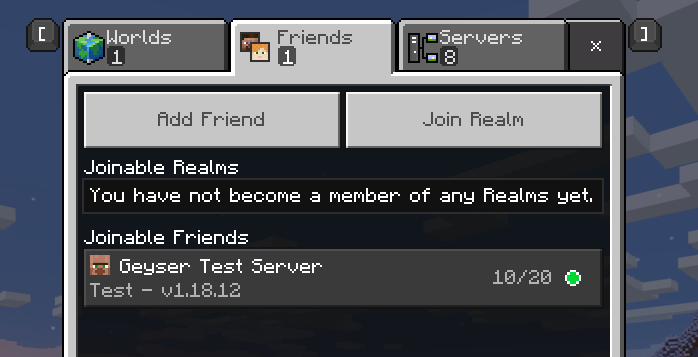
This shows up to the authenticated accounts friends in-game as a joinable session.
DISCLAIMER
You use this project at your own risk, the contributors are not responsible for any damage or loss caused by the software. We suggest you use an alt account for running the tool in case the account is banned as we emulate some features of a client which may or may not be against TOS.
Features
- Syncing of MOTD and other server details
- Automatic friend list management
- Easy Geyser integration (as an extension)
- Shows as online and playing Minecraft in the Xbox app and website
- Multi-account support
- Web manager for larger networks
- Uploading of a custom image for the account (see below for more info)
Pterodactyl Panel
There is an egg for easy instance creation supplied for Pterodactyl Panel, this being egg-m-c-xbox-broadcast.json
Docker
There is a docker image available for the standalone version of the tool, this can be found at ghcr.io/mcxboxbroadcast/standalone:latest
docker run --rm -it -v /path/to/config:/opt/app/config ghcr.io/mcxboxbroadcast/standalone:latest
Installation
Extension
- Download the latest release file
MCXboxBroadcastExtension.jar - Drop the extension into the Geyser
extensionsfolder - Restart the server
- Wait for the extension to start and present you with an authentication code
To sign in, use a web browser to open the page https://www.microsoft.com/link and enter the code XXXXXXXX to authenticate.
- Follow the link and enter the code
- Login to the account you want to use
- Add the account as a friend on Xbox LIVE
- Check the friends tab ingame and you should see the server listed
Standalone
- Download the latest release file
MCXboxBroadcastStandalone.jar - Start the jar file using
java -jar MCXboxBroadcastStandalone.jar - Wait for the extension to start and present you with an authentication code
To sign in, use a web browser to open the page https://www.microsoft.com/link and enter the code XXXXXXXX to authenticate.
- Follow the link and enter the code
- Login to the account you want to use
- Add the account as a friend on Xbox LIVE
- Edit the
config.ymlto have the correct ip and port for the target server - Restart the tool
- Check the friends tab ingame and you should see the server listed
Manager
There is a web manager available for donators. After joining the relevent GitHub sponsors tier you will be able to access its builds at https://github.com/MCXboxBroadcast/Manager/releases
Note: This also requires a MongoDB instance to be running
Screenshots
Custom Image
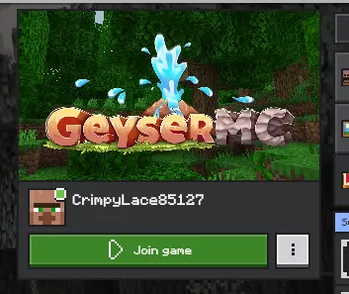
You can add a custom image to the profile page for the account by placing a screenshot.jpg in the same directory as the config.yml.
The best settings for this image are 1200x675, quality 90 and chroma subsampling 4:2:0.
This can take a few minutes to update on the Xbox Live servers and show ingame.
Commands
For the extension version prefix with /mcxboxbroadcast
| Command | Description |
|---|---|
exit (Standalone Only) | Exits the program |
restart | Restarts the tool |
dumpsession | Dumps the current session data to files for debugging |
accounts list | Lists the accounts that are currently in use and their friend count |
accounts add <sub-session-id> | Adds an account to the list of accounts to use |
accounts remove <sub-session-id> | Removes an account from the list of accounts to use |