Nostalgia Ultra Shader
ModrinthDownload Nostalgia Ultra, the retro Minecraft shader that brings back Beta 1.7 to 1.5.2 visuals in 4K. CRT scanlines, turquoise water, orange torches, electric blue sky. Works with Iris & Sodium. 6 languages.
16.2 · MC 1.21.11 · Iris, Optifine
Files
16.2
releaseNostalgia Ultra Shader 16.2
1.21.111.21.101.21.91.21.8+31irisoptifine2026-09-09 · 4K downloads
Nostalgia_Ultra-V16.2.zip · 133 KB
Nostalgia_Ultra-V10
releaseV10
1.21.111.21.101.21.91.21.8+8irisoptifine2025-12-24 · 17K downloads
Nostalgia_Ultra-V10.zip · 58 KB
Nostalgia_Ultra-V9
betaV9
1.21.111.21.101.21.91.21.8+8irisoptifine2025-12-24 · 54 downloads
Nostalgia_Ultra-V9.zip · 50 KB
Nostalgia_Ultra-V8
betaV8
1.21.111.21.101.21.91.21.8+8irisoptifine2025-12-24 · 40 downloads
Nostalgia_Ultra-V8.zip · 50 KB
Nostalgia_Ultra-V7
releaseV7
1.21.111.21.101.21.91.21.8+8irisoptifine2025-12-24 · 71 downloads
Nostalgia_Ultra-V7.zip · 55 KB
Nostalgia_Ultra-V6
betaV6
1.21.111.21.101.21.91.21.8+8irisoptifine2025-12-24 · 37 downloads
Nostalgia_Ultra-V6.zip · 54 KB
Nostalgia_Ultra-V5
releaseV5
1.21.111.21.101.21.91.21.8+8irisoptifine2025-12-24 · 104 downloads
Nostalgia_Ultra-V5.zip · 54 KB
Nostalgia_Ultra-V4
releaseV4
1.21.111.21.101.21.91.21.8+8irisoptifine2025-12-24 · 53 downloads
Nostalgia_Ultra-V4.zip · 49 KB
Nostalgia_Ultra-V3
betaV3
1.21.111.21.101.21.91.21.8+8irisoptifine2025-12-24 · 38 downloads
Nostalgia_Ultra-V3.zip · 48 KB
Nostalgia_Ultra-V2
betaV2
1.21.111.21.101.21.91.21.8+8irisoptifine2025-12-24 · 37 downloads
Nostalgia_Ultra-V2.zip · 46 KB
Nostalgia_Ultra-V1
releaseV1
1.21.111.21.101.21.91.21.8+8irisoptifine2025-12-24 · 81 downloads
Nostalgia_Ultra-V1.zip · 45 KB
Files are delivered unmodified from Modrinth's servers and verified against the SHA-512 hash published by the project. The project's license applies to every file; check it before redistributing.
Gallery

About
Nostalgia Ultra
Beta 1.7 to Release 1.5.2 visuals rebuilt in 4K: turquoise oceans, deep orange torchlight, electric skies, and optional CRT scanlines.






You remember it. That first world. The blue sky that felt bigger than it was. The way torchlight turned a dark cave into something warm instead of scary. The water that looked like someone had mixed turquoise paint into the ocean.
Mojang updated Minecraft over the years, and the modern game is great, yet it does not carry that same visual mood. Nostalgia Ultra recreates how Minecraft actually looked and felt between Beta 1.7 and Release 1.5.2, studied frame by frame and color by color from period screenshots, old forum threads, and 2011–2013 recordings, then rebuilt in 4K with modern shadow mapping, real water optics, and smooth performance on Iris and Sodium.
Not a post-processing color filter. Every lighting, sky, water, and dimension pass was written specifically around the 2011–2013 aesthetic.


Visual Passes & Features
| Shader Pass | |
|---|---|
 | 2011–2013 Color Science & Optional CRT CRTs and early LCD monitors from that era had a distinct gamma curve and color temperature ( ~6500K). Nostalgia Ultra reproduces those boosted warm midtones, punchy Beta grass greens, electric sky blues, and soft GPU-style ambient occlusion along block edges. Includes a toggleable CRT mode with real scanlines, subtle curvature, and edge chromatic aberration. |
 | Release 1.3 Turquoise Water Matched directly to Minecraft 1.3's iconic translucent turquoise hue, upgraded with natural wave motion, real-time screen-space reflections, underwater caustics across riverbeds and ocean floors, shore foam, and a smooth depth gradient from bright shallow turquoise into deep ocean blue. |
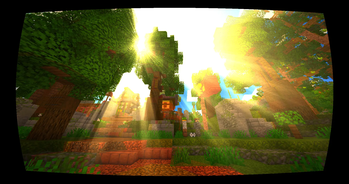
 | Classic Skybox, Soft Shadows & Orange Torches Brings back an oversized sun with a warm yellow halo, high-density night starfields, blurry soft-edged shadow maps instead of razor-harsh outlines, volumetric godrays through tree canopies and cave mouths, layered sunsets ( orange → pink → deep purple), cool blue moonlight, and true deep orange torchlight. |
 | Built for 60+ FPS at 4K on Iris + Sodium Every pass was profiled from day one on Iris + Sodium using clean rasterization and screen-space effects rather than heavy ray-tracing. Runs at 60+ FPS in 4K on a GTX 1070 / RX 580 and scales down effortlessly to a GTX 1050 or laptop GPU by lowering shadow and godray resolution in settings. |
Dimension-Specific Atmosphere
| Dimension | Visual Treatment | |
|---|---|---|
| Overworld | Warm 6500K daylight, saturated foliage, electric Beta skies, glowing orange caves, and crystal turquoise coastlines. |
 | The Nether | Heavy blood-red distance fog, tight visibility range, and oppressive crimson tinting across terrain and structures. |
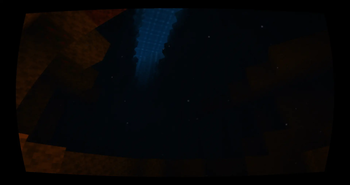
 | The End | Deep purple-black void with fixed non-flickering stars and cold, otherworldly lighting that feels completely alien. |
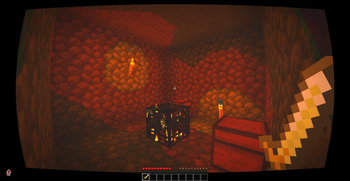
 Deep warm orange torchlight inside caves and mineshafts
In-Game Settings Menu (6 Languages)
Every pass can be tuned or toggled directly inside Shader Pack Settings with zero config files to edit by hand:
| Category | Adjustable Options | |
|---|---|---|
 | Style | Color grading curve, CRT toggle, saturation, contrast |
| Water | Wave intensity, water transparency, reflection quality, shore foam toggle |
 | Sky | Sun size, night star density, fog distance, cloud appearance |
 | Lighting | Shadow map resolution, torch warmth, volumetric godray strength, bloom |
 | Effects | CRT scanline density, screen curvature, motion blur, vignette |
Translated in-game into English · Français · Deutsch · Español · Português · Русский
Installation & Requirements
- Install Iris Shaders (+ Sodium, bundled automatically when using the Iris installer).
- Download the latest
Nostalgia_Ultra.zipfrom this page and drop it into yourshaderpacks/folder (keep it as a.zipfile, do not extract it). - In Minecraft, open Options → Video Settings → Shader Packs and select Nostalgia Ultra.
Where is my shaderpacks folder? (Windows, macOS & Linux)
- In-game shortcut: Click Open Shader Pack Folder inside
Video Settings → Shader Packs. - Windows: Press Win + R, enter
%appdata%\.minecraft\shaderpacks, and press Enter. - macOS:
~/Library/Application Support/minecraft/shaderpacks/ - Linux:
~/.minecraft/shaderpacks/
| Component | Minimum | Recommended (4K / 60+ FPS) |
|---|---|---|
| Minecraft Java | 1.16 – 1.21.11 | 1.21.x |
| Shader Loader | Iris Shaders | Iris + Sodium |
| Graphics Card | GTX 1050 / RX 560 | GTX 1070 / RX 580 or newer |
| Allocated RAM | 4 GB | 6 – 8 GB |
Resource Pack Tip: Nostalgia Ultra needs no PBR resource pack. Default vanilla textures (or Minecraft's built-in Programmer Art pack for classic pre-1.14 blocks) give the truest 2011–2013 look.
Frequently Asked Questions
Does this work on OptiFine?
Nostalgia Ultra is built and profiled specifically for Iris Shaders. Many versions also load on OptiFine, but Iris + Sodium delivers far better framerates, cleaner mod compatibility, and full support for every pass.
Why Beta 1.7 to Release 1.5.2 specifically?
Release 1.5.2 was the final milestone before Minecraft's visual shift began. Starting around 1.6 and later texture/lighting updates, sky rendering, water tones, and overall color balance gradually changed. For players who started during Minecraft's early golden era, Beta 1.7 – 1.5.2 is the exact look etched into memory.
My water or sky colors look unusual. How do I fix it?
A custom resource pack is likely overriding skymaps, lightmaps, or water textures. Test with default vanilla textures enabled first; if the colors look right on vanilla, move or disable the conflicting resource pack's custom sky/water overlays.
Is this a ray-tracing or labPBR shader?
No. Nostalgia Ultra uses standard rasterization paired with custom screen-space reflections, caustics, and volumetric light shafts so it stays faithful to classic Minecraft geometry while running fast on everyday GPUs.
Can I include Nostalgia Ultra in my modpack or videos?
Yes! Feel free to include it in Modrinth modpacks or showcase it in videos and streams. A link back to this page is always appreciated; please just do not re-upload the .zip file to third-party download mirrors.
Why This Shader Exists
"I've been playing Minecraft since 2011. You can still launch Beta 1.7 in the official launcher today, yet it doesn't look the same on a modern panel as it did back then. The color science is off, the lighting feels flat, and the sky feels empty.
I didn't want what raw legacy code outputs on a modern display. I wanted what Minecraft actually felt like on a 2012 monitor in a dark room at 2 AM. Built for everyone who started playing between 2011 and 2013 and never really stopped thinking about it."
Need help, want to share screenshots of your world, or suggest tweaks? Join our Discord server.
Project icon artwork by Elfi (@elfi_draw) · Licensed under MIT