
Trailer Shaders
ModrinthMake your game look like a Minecraft trailer — but with higher FPS.
r1.6 · MC 26.2 · Iris, Optifine
Files
r1.6
releaseTrailer Shaders r1.6
26.226.1.226.1.126.1+24irisoptifine2026-09-02 · 51.5K downloads
TrailerShaders_r1.6.zip · 130 KB
1.5
releaseTrailer Shaders v1.5
26.226.1.226.1.126.1+24irisoptifine2026-08-25 · 7.9K downloads
TrailerShaders_v1.5.zip · 129 KB
1.4
releaseTrailer Shaders v1.4
26.226.1.226.1.126.1+19irisoptifine2026-06-27 · 72.3K downloads
TrailerShaders_v1.4.zip · 130 KB
1.3
releaseTrailer Shaders 1.3
26.1.226.1.126.11.21.11+18irisoptifine2026-06-14 · 9.7K downloads
TrailerShaders_v1.3.zip · 129 KB
1.2
releaseTrailer Shaders 1.2
26.1.226.1.126.11.21.11+23irisoptifine2026-06-08 · 5K downloads
TrailerShaders_v1.2.zip · 129 KB
1.1
releaseTrailer Shaders v1.1
26.1.226.1.126.11.21.11+18iris2026-06-05 · 2.9K downloads
TrailerShaders_v1.1.zip · 128 KB
1.0.1
releaseTrailerShaders - v1.0.1
26.11.21.111.21.101.21.9+17iris2025-12-05 · 83.5K downloads
TrailerShaders.zip · 129 KB
1.0.0
releaseBareBone Shaders - 1.0.0
1.21.101.211.201.19iris2025-10-12 · 18K downloads
BareBone Shaders.zip · 128 KB
Files are delivered unmodified from Modrinth's servers and verified against the SHA-512 hash published by the project. The project's license applies to every file; check it before redistributing.
Gallery

About

ABOUT
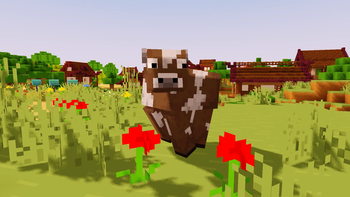
Trailer Shaders is a lightweight shader pack inspired by the visuals seen in official Minecraft trailers. While many high-end players combine Complementary Shaders with BareBones texture packs to achieve that clean, cinematic look, BareBone Shaders delivers the same trailer-like aesthetic with higher FPS. It’s designed to give you vibrant lighting, smooth shadows, and a true “Minecraft trailer vibe” — all optimized for performance on low to mid- end PCs.
Features
Trailer Shaders comes with simple yet powerful features designed to give your game a clean, trailer-like look with smooth performance.
-
Bloom Effect: Adds a soft glow to lighting for a cinematic feel. You can easily turn it on or off in the shader settings.
-
Custom Color Control: Adjust the red, green, and blue levels in settings to fine-tune the overall tone and mood of your game.

How to report BUGS!!
Our GlacierDevelopment Discord server is Live you can report bugs and Chat with other GlacierShaders users, report bugs, get help with issues, and join exciting giveaways — all in one place!
